Operational audits for hotels
Hotel audit checklist software with scores, photos and action plans
A hotel audit checklist is the list of items a hotel checks regularly to keep safety, brand standards and maintenance in order. In Hotel em Dia, that checklist becomes an operational audit: each item has a weight, the score is calculated automatically and each issue becomes an action with a due date.
- No credit card required
- All hotels and users during the trial
- Works on desktop and mobile
Pillars
Which areas does the operational audit cover?
Audits are organized by pillar, the areas that matter most for safety and the guest experience. Each pillar has its own template, with sections and items.
Safety (Life & Safety)
Fire prevention and firefighting, escape routes, emergency lighting, fire brigade, signage and fire department access.
Operations & Standards
Front desk, service, brand standards, public areas and the guest experience from check-in to check-out.
Maintenance
Air conditioning, electrical, plumbing, elevators, pool and preventive maintenance of equipment.
Housekeeping
Guest room cleaning and servicing, linen, laundry, public areas and the inspection of rooms before they are released.
Food & Beverage (F&B)
Kitchen, storage, food expiry dates and temperatures, food handler hygiene and breakfast.
Your way
The ready-made templates are a starting point. The chain adjusts weights, items and guidance to its brand standards. Already have a checklist? The AI imports it from Excel, PDF or Word.
Scale
How is each item assessed?
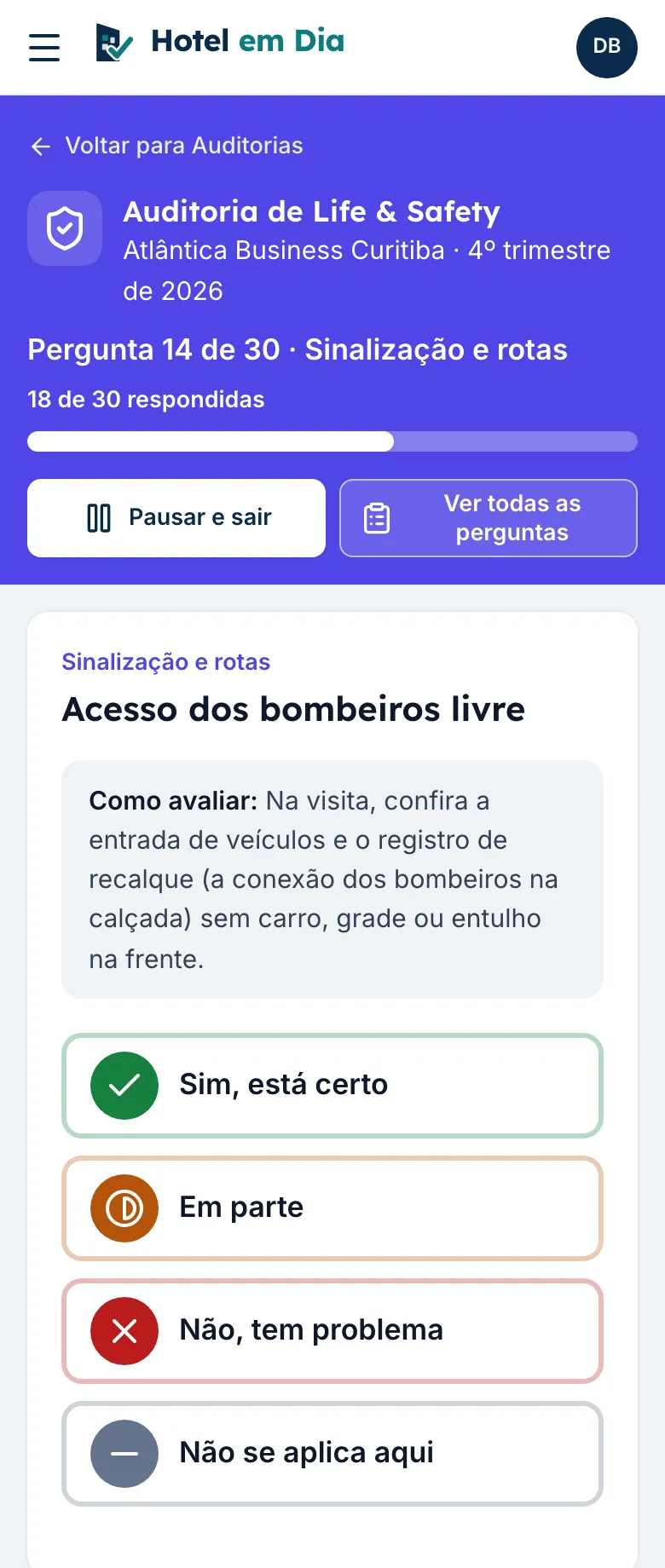
Each item gets one of four answers. On the phone screen they appear in plain words, so no one gets it wrong.
| Answer | On the phone screen | How it counts toward the score |
|---|---|---|
| C, Compliant | “Yes, it is right” | Worth the item's full weight. |
| PC, Partially compliant | “Partly” | Worth half the weight. Can become an action. |
| NC, Noncompliant | “No, there is a problem” | Worth zero. Becomes an action with a due date. |
| NA, Not applicable | “Does not apply here” | Left out of the calculation. |
For simple items, the chain can also use a Yes or No scale.
Weighted score
How is the audit score calculated?
Each item has a weight from 1 to 3, and each section has its own weight too. The score is the sum of the points earned divided by the sum of the possible points for the items that apply, times 100.
- Weight 3 for what matters for safety or the law, weight 1 for details of the standard.
- Items tied to documents, such as the fire certificate or the lightning protection report, are answered by the Document Vault: an expired document already shows up as an issue.
- The audit score feeds the pillar in the hotel's Operational Health Index.
| Item | Weight | Answer | Points |
|---|---|---|---|
| Fire extinguishers with clear access | 3 | C | 3 of 3 |
| Emergency lighting | 3 | PC | 1.5 of 3 |
| Escape route signs | 1 | NC | 0 of 1 |
| Lifeguard at the pool | 2 | NA | left out |
| Score: 4.5 ÷ 7 × 100 | 64.3% | ||
Below the 80% minimum: both issues become actions, and the next audit shows whether the hotel improved.
Rules for each template
What does the chain configure in each audit?
What is a critical item?
It is an item that cannot fail, such as a blocked emergency exit or expired food. If it is noncompliant, the audit is flagged with a serious issue, and the action is created with serious priority and a short deadline. The score is also capped at 1 point below the chain's minimum: with an 80% minimum, at most 79%, and the hotel's Index for the quarter gets the same cap. The chain can switch this rule off.
When is a photo required?
Each item has its own rule: a photo is always required, required only when noncompliant, or not required. The photo is taken with the phone camera on the spot and saved with the answer.
What are the minimum and target thresholds?
Each template sets the score at which a hotel reaches the acceptable minimum and the target. The default is an 80% minimum and a 90% target. The color of the score, at the hotel and on the chain dashboard, follows these thresholds, always with an icon and a word.
- Below minimum
- Below target
- On target
How often should each audit be done?
The chain chooses the frequency for each area: monthly, every 2 months, every 3 months, every 6 months or once a year. Hotel managers see on their home screen what still needs auditing in the period, and leadership sees who is behind.
What's new
What is new in audits?
Audits for the corporate team only, and AI features that save the work of building the checklist and writing the action.
Internal audits
Only the corporate team sees them: the administrator and the regional manager run them, leadership follows them, and the hotel manager does not see them. They stay out of the hotel's score and Index.
Import checklists with AI
Upload the chain's checklist in Excel, PDF or Word. The AI suggests sections, questions, weights and critical items, and you review before creating the template.
Suggest actions with AI
In the audit review, the Suggest action button writes what to do and the priority for each issue. You edit before finishing.
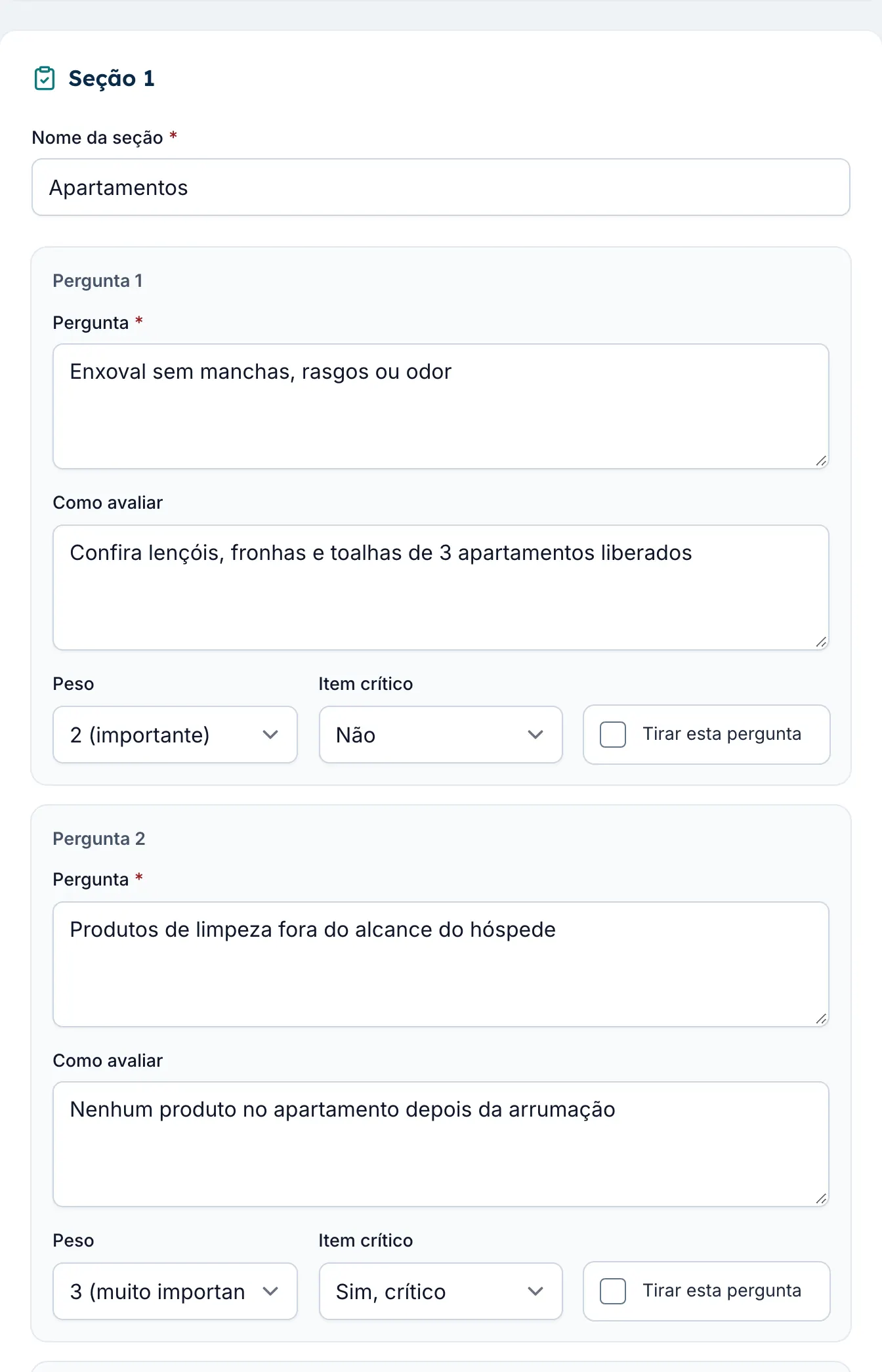
The AI suggests, a person confirms: the imported checklist only becomes a template after your review, and only counts when you switch it on.
See all the AI features for hotelsAction plan
What happens to each nonconformity?
The issue does not get lost in the report. It becomes an action, with an owner and a due date, until someone confirms it was resolved.
-
Step 1: Becomes an action
When the audit is finished, serious issues are already marked to become actions. The auditor confirms and explains any that are left out.
-
Step 2: Gets a due date
The default deadline is 7 days for serious issues, 15 for weight 3 items and 30 for the rest. The chain can change them.
-
Step 3: The hotel resolves it
The hotel manager describes what was done and sends a photo, straight from the phone.
-
Step 4: The regional manager checks
The regional manager approves it or sends it back. No one approves their own action, and everything stays in the history.
Examples
Sample hotel checklist items
A few items per pillar, with the weight and whether they are critical, as a starting point. Adapt them to your operation and your brand standards.
| Item | Weight | Critical |
|---|---|---|
| Fire extinguishers within their expiry date, signposted and with clear access | 3 | Yes |
| Emergency exits and escape routes clear and signposted | 3 | Yes |
| Emergency lighting turns on in the daily test | 3 | No |
| The shift's fire brigade roster posted and up to date | 2 | No |
| Item | Weight | Critical |
|---|---|---|
| Front desk team in uniform and name badge, to brand standard | 1 | No |
| Mandatory guest information visible at the front desk | 2 | No |
| The month's complaints logged and answered | 2 | No |
| Public areas clean, well lit and with furniture in good condition | 2 | No |
| Item | Weight | Critical |
|---|---|---|
| The month's preventive maintenance plan completed and logged | 3 | No |
| Guest room air conditioning filters cleaned on schedule | 2 | No |
| No leaks in bathrooms, corridors or the machine room | 2 | No |
| Electrical panels closed, labeled and with no makeshift wiring | 3 | Yes |
| Item | Weight | Critical |
|---|---|---|
| Linen free of stains, tears or odor | 2 | No |
| Each room inspected by a supervisor before it is sold | 2 | No |
| Housekeeping cart organized, with labeled products | 1 | No |
| Cleaning products stored away from food and guests | 2 | No |
| Item | Weight | Critical |
|---|---|---|
| Food stored with expiry date labels | 3 | Yes |
| Cold room temperatures logged twice a day | 3 | No |
| Food handlers in uniform and hair covering, with no jewelry | 2 | No |
| Breakfast set up and replenished at the advertised times | 1 | No |
What about the hotel's documents?
Fire certificates, operating permits, health licenses and inspection reports do not need a manual checklist item: the Document Vault tracks the expiry date of each one and sends an alert before it expires.
See document expiry trackingFAQ
Frequently asked questions about hotel audit checklists
What is the difference between a checklist and an operational audit?
The checklist is the list of items. The operational audit is applying that list at a hotel, on a date, with answers, photos and a score. In Hotel em Dia, each audit records who did it, when and what they found.
Can I use my own items?
Yes. The account comes with templates by pillar, and the chain can create, change or remove sections and items, with the weight, the assessment guidance and the photo rule for each one. When a template changes, past audits keep the version used at the time.
Who does the audit?
The hotel's own manager, the regional manager or the chain's auditor. The chain decides whether hotel managers can audit their own hotel.
Do items that do not apply count toward the score?
No. An NA answer is left out, and the score is calculated only with the items that apply to the hotel.
Can I pause an audit halfway through?
Yes. Answers are saved, and the audit picks up where it left off, on the phone or on the computer.
Are past audits kept?
Yes. Each audit stays in the hotel's history, with the answers, photos and score, and the trend shows up by quarter in the Operational Health Index.
Can I import the checklist my chain already uses?
Yes. The administrator uploads the file in Excel (.xlsx), PDF or Word (.docx), and the AI suggests the sections, questions, assessment guidance, weights and critical items. You review it in a table before creating it, and the template starts switched off.
What is an internal audit?
It is an audit that only the corporate team sees. The administrator and the regional manager run it, leadership follows it, and the hotel manager does not see it. It stays out of the hotel's score and Index and does not create actions.
Take your checklist from paper to a hotel score.
Create your chain's account, add your first hotel today and watch the dashboard come together. Or book a demo with us.
- No credit card required
- All hotels and users during the trial
- Works on desktop and mobile