Document Vault
Hotel document expiry tracking
Document expiry tracking means staying on top of the licenses, permits and inspection reports a hotel needs to keep valid in order to operate. In Hotel em Dia, the Document Vault alerts you before they expire and shows the status of every hotel in the chain on a single screen.
- No credit card required
- All hotels and users during the trial
- Works on desktop and mobile
Step by step
How does the Document Vault work?
Each document has a cycle: it arrives with its expiry date, gets alerts before it expires and starts over when it is renewed.
-
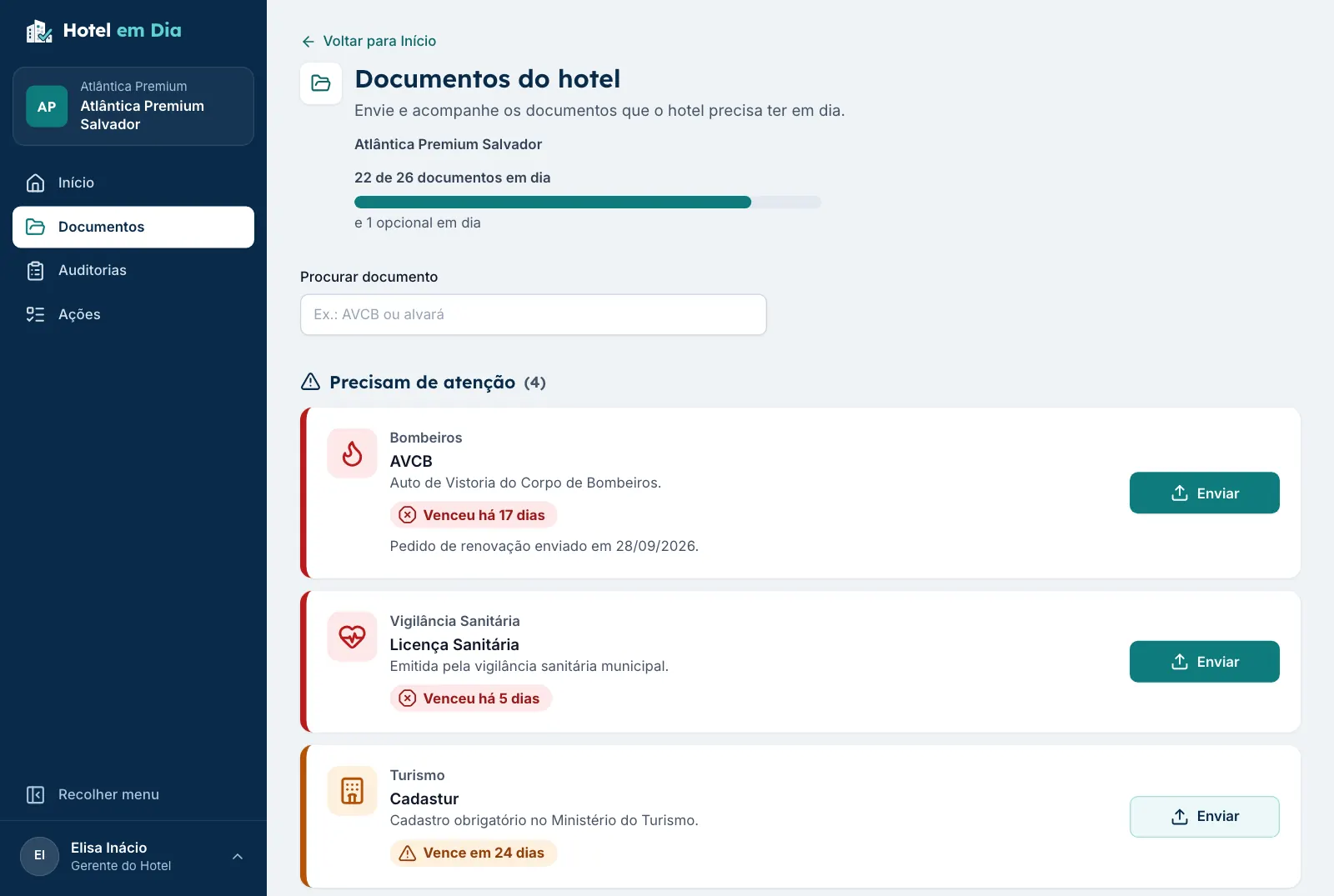
Step 1: The hotel uploads the file and the expiry date
The hotel manager uploads the PDF or takes a photo of the document with the phone and enters the expiry date. For recurring services, such as water tank cleaning, the date it was done is enough.
-
Step 2: Hotel em Dia tracks the deadline
The status changes on its own as the days go by: valid, expiring soon, expired or missing. No one has to check a spreadsheet.
-
Step 3: Alerts before expiry
The hotel manager and the regional manager get email alerts at 90, 60 and 30 days, deadlines the chain can change for each document type.
-
Step 4: Expired becomes noncompliant
The day after expiry, the document becomes expired, lowers the hotel's score and the alert repeats every 7 days.
-
Step 5: Renewal restarts the cycle
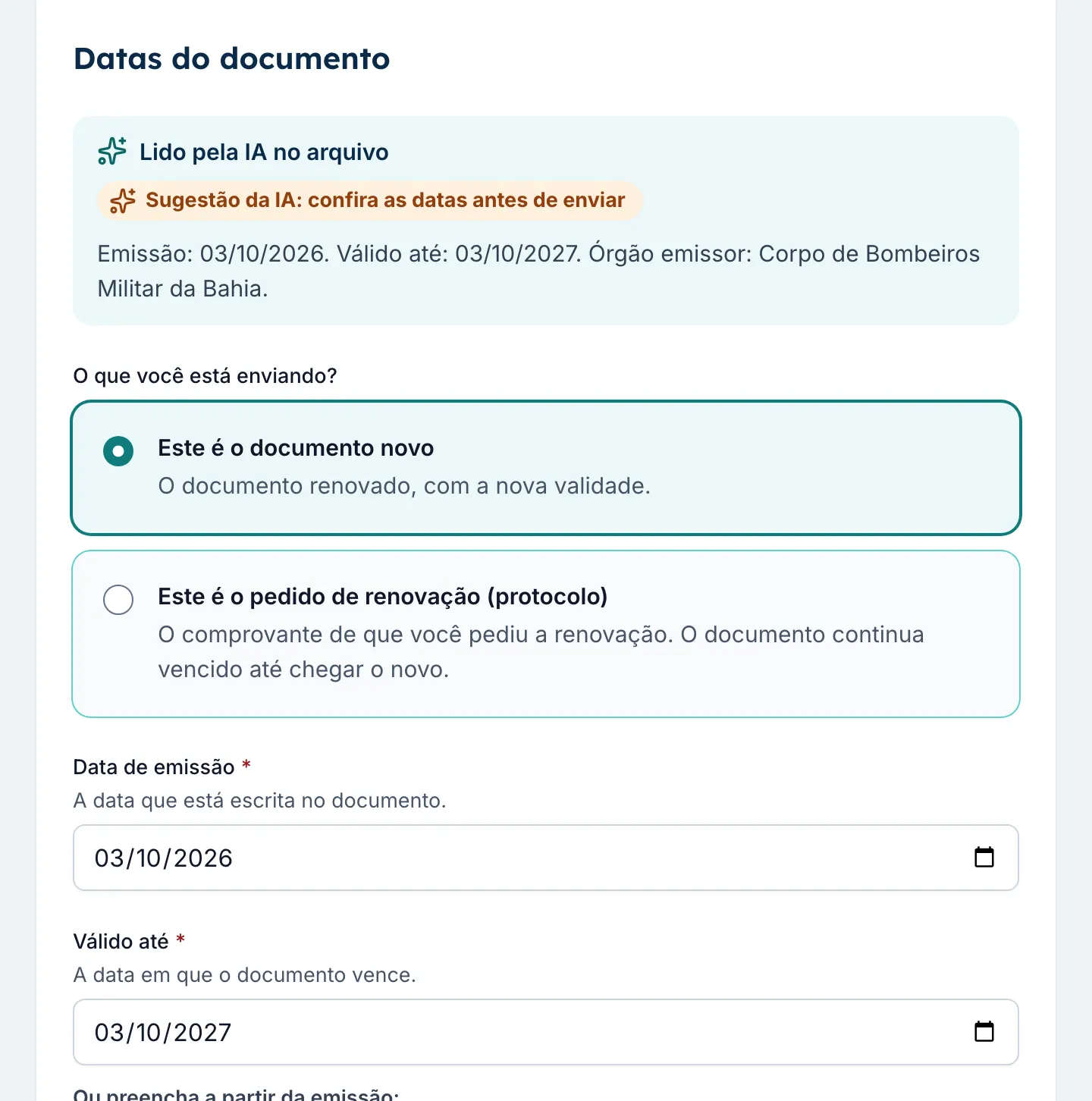
The hotel uploads the new file with the new expiry date, and the alerts start over. The previous version stays in the history.
No manual action plan for each document
In generic tools, tracking expiry dates becomes a task created by hand for each document at each hotel. Here the document comes with its deadline, alerts are automatic and renewal restarts the cycle on its own. Already requested the renewal? The hotel uploads the filing receipt, and everyone knows the process is moving.
What's new
How does Hotel em Dia check an uploaded document?
Before a document counts, Hotel em Dia checks the file, the AI reads the dates and, if the chain wants, the corporate team approves it.
- File check Empty files, PDFs without pages, images that will not open and expiry dates before the issue date are blocked. Small or dark photos, files already uploaded in the chain, expiry dates already past or too far out and issue dates in the future trigger a warning before sending.
- AI reading The AI reads the issue date, the expiry date and the issuing authority and fills in the dates for the hotel manager to check. If the file looks like a different document, the screen warns.
- Corporate approval For the types the chain chooses, an upload only counts after the administrator or the regional manager approves it. If it is sent back, the hotel manager gets the reason.
- Not applicable, with a reason A document that does not apply to the hotel drops out of the calculation with a written reason, and the corporate team sees who marked it.
Status of each document
What does each document status mean?
The status is calculated every day from the expiry date and today's date. The hotel's percentage of up-to-date documents comes from here: 27 up to date, counting valid and expiring soon, out of 30 required is 90%.
| Status | When | What happens |
|---|---|---|
| Valid | Uploaded and within its expiry date. | Counts as up to date. |
| Expiring soon | Expires in the coming days (default: 60). | Counts as up to date and receives the alerts, so the renewal starts early. |
| Expired | Past its expiry date. | Noncompliant: lowers the hotel's score and the alert repeats every week. |
| Missing | Required, but never uploaded. | Counts as pending and appears in the chain's weekly summary. |
| Not applicable | Does not apply to that hotel, such as a water use permit for a well that does not exist. | Drops out of the hotel's calculation. |
For management
How do you see the documents of every hotel at once?
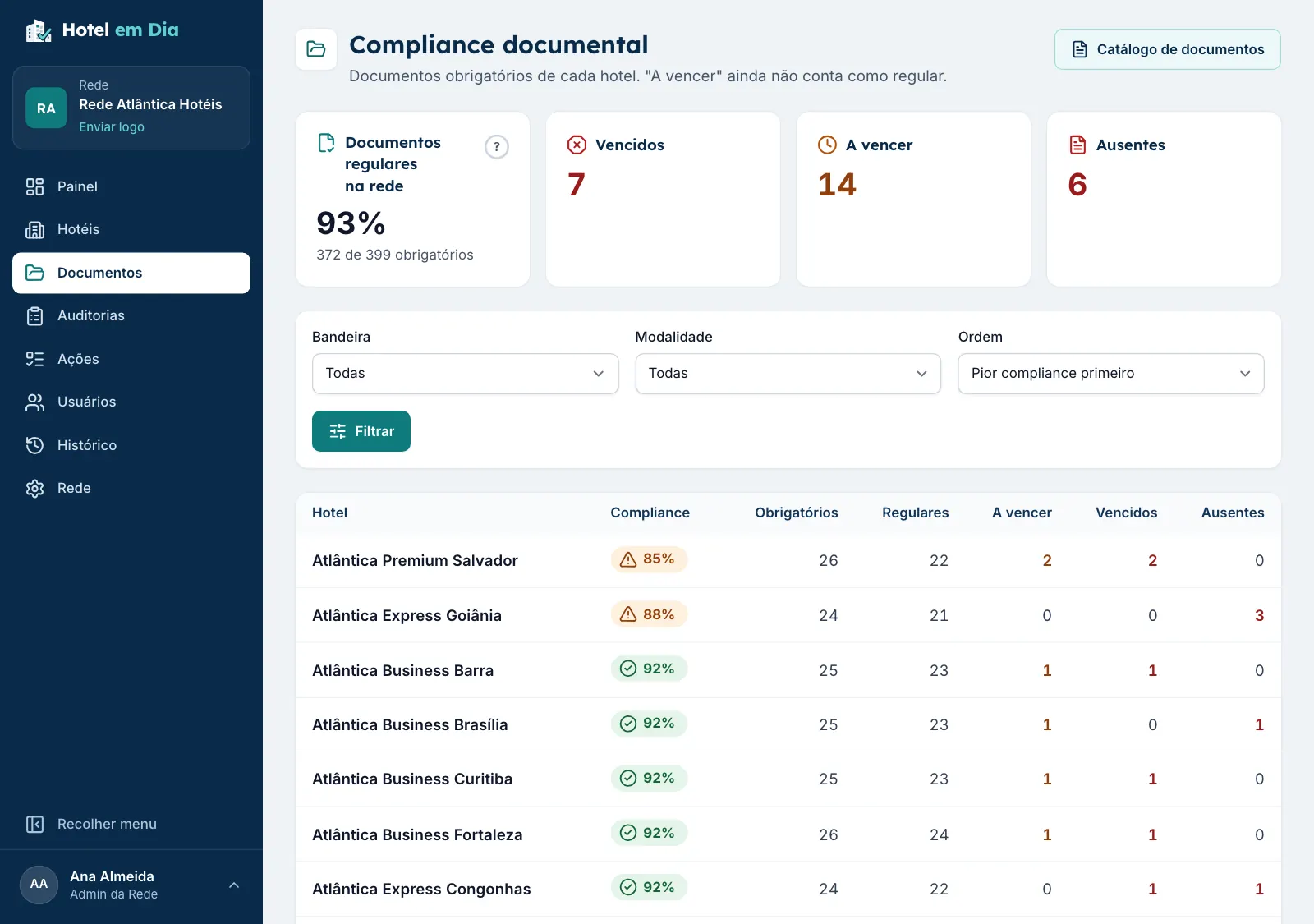
The chain's documents screen shows, hotel by hotel, how many documents are valid, expiring soon, expired and missing, with the percentage for each.
- Filters by brand and by operating model, from worst to best.
- One click on a hotel opens the list: "AVCB expired 17 days ago", "Cadastur expires in 24 days".
- Weekly email summary for the chain administration.
- The percentage of up-to-date documents feeds the Operational Health Index with its own weight.
Guide
Documents a hotel in Brazil usually needs to keep valid
A starting list of the most common hotel documents in Brazil, for anyone setting up expiry tracking.
Note: requirements and document names vary from state to state and from city to city in Brazil, and depend on the size and structure of the hotel. This guide is general and does not replace guidance from the local authority, your consultant or the professional in charge.
| Document | What it is for | Who issues or signs it | Renewal |
|---|---|---|---|
| Fire department certificate (AVCB or CLCB) | Certifies that the building meets fire prevention and firefighting rules. The name changes in some states, such as APPCI in Rio Grande do Sul. | State fire department | Term written on the document itself. It varies by state and by building size. |
| Operating permit | Authorizes the hotel to operate at that address. | City hall | Varies by city: in some it is annual, in others it does not expire. |
| Health license | Clears the operation from a public health standpoint, including the kitchen and the restaurant. | City or state health surveillance agency | Usually annual. Check the local rule. |
| Cadastur | Mandatory registration of lodging establishments with Brazil's Ministry of Tourism, under Law 11,771/2008. | Ministry of Tourism | Periodic renewal. The validity appears on the certificate. |
| HVAC maintenance plan (PMOC) | Maintenance, operation and control plan for air conditioning, mandatory in public and shared-use buildings with climate control, under Law 13,589/2018. | Responsible engineer, with an ART (technical responsibility record) | Kept up to date, with the plan's maintenance done on time. |
| Lightning protection report (SPDA) | Shows that the lightning protection system works, under the ABNT NBR 5419 standard. | Engineer, with an ART | Periodic inspection. The interval depends on the type of building. |
| Elevator maintenance | Contract with a maintenance company and, in many cities, the annual inspection report. | Registered maintenance company | Usually monthly maintenance and an annual report where required. |
| Pest control | Pest and rodent control certificate. | Licensed pest control company | Validity stated on the certificate. Many hotels do it every 3 or 6 months. |
| Water tank cleaning | Certificate of cleaning and disinfection of the water tanks. | Specialized company | Usually every 6 months. Check the local rule. |
| Drinking water quality | Laboratory report on the analysis of the drinking water. | Accredited laboratory | Frequency set by the local health surveillance agency. |
| Fire brigade | Training certificate for the team that acts in an emergency. | Qualified company or instructor | Usually an annual refresher. |
| Electrical installation report | Shows that the electrical installation is safe and compliant. | Electrical engineer, with an ART | Frequency set by the technical lead. |
| Occupational health and safety programs (PGR and PCMSO) | The team's occupational health and safety programs, under the NR-1 and NR-7 regulatory standards. | Occupational safety and occupational health professionals | Periodic review, as the standards require. |
| Environmental license, when applicable | Required depending on the activity, size and location. A hotel with an artesian well also needs a water use permit. | State or city environmental agency | Term written on the license. |
| Property and liability insurance | Current policies for the building and the operation. | Insurer | Usually annual. |
| Certificate of occupancy | Certifies that construction was completed according to the approved plans. | City hall | Does not expire. Kept in the Vault for whenever it is requested. |
All of these documents come in Hotel em Dia's starter catalog, with guidance. The chain removes what it does not use and creates its own.
Why it matters
Why is an expired document a risk for a hotel?
An expired document is rarely one person's oversight. It is the lack of an alert at the right time, and the cost shows up all at once.
- Closure and fines Without a valid fire certificate or operating permit, the hotel is exposed to penalties and even closure during an inspection.
- Insurance In a claim, an expired safety document can cause problems when the insurer decides on coverage.
- Brand standards The brand, the management company and the investors expect the hotel to be up to date. An expired document becomes an open item in the audit.
- Hotel score In Hotel em Dia, an expired document lowers the percentage of up-to-date documents and the hotel's Index, and shows up on the chain dashboard.
Comparison
Expiry spreadsheet or Document Vault?
A spreadsheet works as long as someone remembers to open it. With many hotels and many documents, it falls behind.
Expiry spreadsheet
- Problem: Someone has to open it and check the dates.
- Problem: The document file sits in another folder, or in someone's inbox.
- Problem: Each hotel updates it its own way, if it updates it at all.
- Problem: The old version is lost when someone overwrites it.
Hotel em Dia Document Vault
- Advantage: Sends alerts on its own at 90, 60 and 30 days.
- Advantage: The AI reads the file and fills in the dates for review.
- Advantage: The file sits next to its expiry date, one click away.
- Advantage: Every hotel follows the same chain catalog.
- Advantage: Each renewal becomes a new version; nothing is deleted.
Not ready to replace your spreadsheet? Start with ours.
A free document expiry tracking spreadsheet in Excel, with the days to expiry and the status calculated from today's date.
FAQ
Frequently asked questions about document expiry tracking
Who receives the expiry alerts?
The hotel manager and the regional manager receive email alerts for each document. The chain administration receives a weekly summary with the expired documents, those expiring within 30 days and the missing ones across all hotels.
Can I change when the alerts are sent?
Yes. By default, alerts go out 90, 60 and 30 days before expiry. The chain can change these for all documents or for a single document type.
What about a document that does not apply to my hotel?
Mark it as not applicable, with the reason. It drops out of the hotel's calculation and stops generating alerts, the mark is recorded in the history, and the administrator and the regional manager see who marked it and why.
What happens when a document expires?
It becomes expired, stops counting as up to date and weighs on the hotel's Operational Health Index. The alert repeats every 7 days until the new version arrives.
Do I need to build the document list from scratch?
No. The account comes with a starter catalog of documents commonly required of hotels in Brazil, with guidance for each one. The chain removes what it does not use and creates its own.
Does the AI fill in the document dates?
Yes, when the chain uses AI reading. The hotel manager picks the PDF or the photo, and the AI reads the issue date, the expiry date and the issuing authority. The dates arrive filled in for review, with a warning if the file looks like a different document or if the date typed in differs from the one read.
Can the corporate team check a document before it counts?
Yes. For each document type, the chain can require approval by the corporate team. The hotel's upload waits, without counting, until the administrator or the regional manager approves it. If it is sent back, the hotel manager gets the reason and uploads it again.
Are the files secure?
Files are stored in a private area, and only people with access to the hotel can open them, through a temporary link. Nothing is deleted: each renewal becomes a new version, and the earlier ones stay in the history.
No document expiring without warning.
Create your chain's account, upload the first documents today and get the next alert before the deadline. Or book a demo with us.
- No credit card required
- All hotels and users during the trial
- Works on desktop and mobile