Free resource, in Excel
Free document expiry tracking spreadsheet
A document expiry tracking spreadsheet lists a hotel's licenses, permits and inspection reports with the expiry date of each one, so no one gets caught by surprise. Ours comes with the right columns, examples and ready-made formulas.
- Days to expiry and status calculated from today's date
- Shows what expires within 30, 60 and 90 days
- Filter by hotel and by status, for more than one hotel
- A sheet with step-by-step instructions
Download the spreadsheet now
Fill in the form and the download is unlocked right away.
Inside
What comes in the expiry spreadsheet?
Two sheets: Documents, with the columns below and the formulas ready, and How to use, with step-by-step instructions. The hotels in the examples are fictional.
- HotelWhich hotel holds the document.
- DocumentThe document name, such as a fire safety certificate or an operating permit.
- Issued byWho issues or signs it.
- Issue dateWhen it was issued.
- Valid untilThe expiry date. Blank if it does not expire.
- Days to expiryCalculated from today's date.
- StatusExpired, expires within 30, 60 or 90 days, or up to date.
- OwnerWho takes care of the renewal.
- NotesFiling number, contact, what is missing.
| Hotel | Document | Valid until | Days to expiry | Status |
|---|---|---|---|---|
| Example Hotel Downtown | Fire safety certificate | 6 Nov 2026 | 25 | Expires within 30 days |
| Example Hotel Downtown | Operating permit | 26 Mar 2027 | 165 | Up to date |
| Example Hotel Downtown | Health license | 7 Oct 2026 | -5 | Expired |
| Example Hotel Downtown | Tourism board registration | 6 Dec 2026 | 55 | Expires within 60 days |
| Example Hotel Downtown | Lightning protection report | 16 Dec 2027 | 430 | Up to date |
| Example Hotel Beach | Pest control certificate | 20 Jan 2027 | 100 | Up to date |
| Example Hotel Beach | Water tank cleaning | 11 Nov 2026 | 30 | Expires within 30 days |
Not sure which documents to include? See the list in the document expiry tracking guide.
Step by step
How do you use the expiry tracking spreadsheet?
-
Step 1: Replace the examples with your documents
One row per document for each hotel: the name, who issues it and the issue date.
-
Step 2: Fill in the expiry date
The Days to expiry and Status columns are calculated automatically. A document that does not expire has a blank expiry date.
-
Step 3: Open it every week
Start with the expired documents and those expiring within 30 days, which need a renewal request right away.
The next step
And when the spreadsheet is no longer enough?
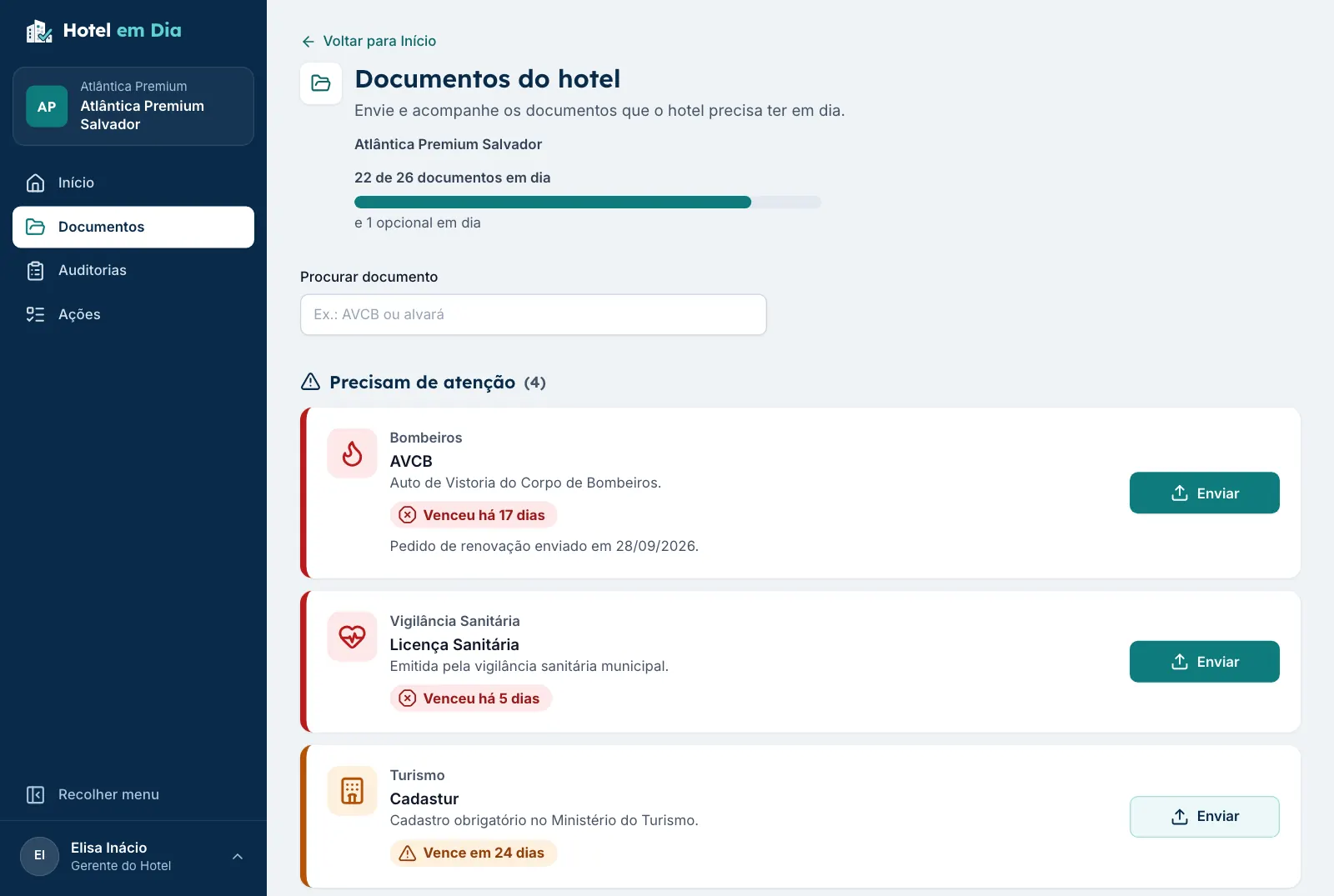
A spreadsheet only works when someone opens it. With many hotels, the Hotel em Dia Document Vault does the work for you.
- Alerts arrive by email at 90, 60 and 30 days, without anyone opening a file.
- The AI reads the document on upload and fills in the dates for review.
- Leadership sees every hotel on one screen, with the percentage of up-to-date documents.
- The file sits next to its expiry date, and each renewal keeps the previous version.
- No credit card required
- All hotels and users during the trial
- Works on desktop and mobile
FAQ
Frequently asked questions about the expiry spreadsheet
Is the spreadsheet really free?
Yes. You enter your name, email and phone number and download it right away. The spreadsheet is yours: use it, copy it and change it as you like.
Does it open in Excel and Google Sheets?
Yes. It is an .xlsx file that opens in Excel, Google Sheets and LibreOffice. The formulas only use common functions, such as IF and TODAY.
How does the spreadsheet calculate the days to expiry?
The Days to expiry column subtracts today's date from the expiry date. The Status column uses that number: Expired, Expires within 30, 60 or 90 days, or Up to date. The formulas are ready in 199 rows.
Does the spreadsheet alert me when a document is about to expire?
No. The spreadsheet calculates when someone opens the file, but it does not send alerts. To have alerts arrive by email at 90, 60 and 30 days, use the Hotel em Dia Document Vault.
Does it work for more than one hotel?
Yes. Each row has a Hotel column, and the header filter shows one hotel at a time. With many hotels, the Hotel em Dia dashboard shows them all at once, with each one's percentage of up-to-date documents.
Which documents should go in the spreadsheet?
The ones the hotel must keep valid in order to operate, such as fire safety certificates, operating permits, health licenses and inspection reports. For hotels in Brazil, the full list, with what each document is, is in the document expiry tracking guide.
From spreadsheet to automatic alerts.
Try the Hotel em Dia Document Vault with your own hotels, or book a demo with us.
- No credit card required
- All hotels and users during the trial
- Works on desktop and mobile